
Working with Projects
Projects save your entire Callie Grams setup: clips, pages, play mode, output assignments, preferences, and hardware mappings.
Project Slots
Section titled “Project Slots”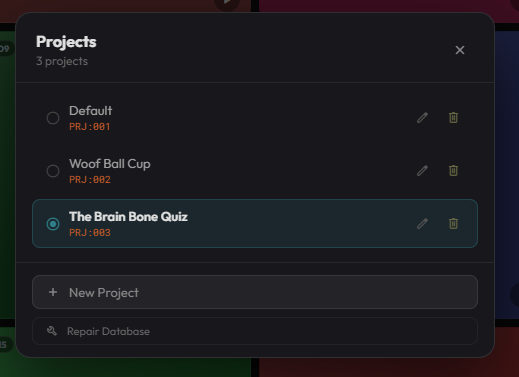
Callie Grams uses project slots for quick recall. Switch between slots with:
- Menu → Projects → Open Projects…
- Web API:
POST /api/v1/projects/PRJ:003/activate - OSC:
/callie/prj/003
Creating a New Project
Section titled “Creating a New Project”Click the project name in the header and choose a different slot, or use Menu → Projects → Open Projects… to create or switch projects.
Saving and Loading
Section titled “Saving and Loading”- Save: Menu → File → Save
- Open / Switch: Click the project name in the header, or Menu → Projects → Open Projects…
Callie Grams project files use the .cpack format when exported as Audio Packs. The working project is stored in a local database and can be saved to a file.
Audio Packs
Section titled “Audio Packs”Audio Packs let you move a complete project between computers. See Audio Packages for details. Migrating from SpotOn instead? See SpotOn Import.
Deleting Projects and Assets
Section titled “Deleting Projects and Assets”The Projects window shows per-project asset usage — how much disk space each project’s audio is taking. When you delete a project, Callie Grams can also delete that project’s assets from disk, reclaiming the space rather than leaving orphaned audio files behind.
Project Best Practices
Section titled “Project Best Practices”- Name projects by show or date:
Morning Show 2026-07-03. - Use project slots for different segments of the same show.
- Export an Audio Pack as a backup before major changes.
- Keep audio files in the same relative paths, or use Audio Packs to bundle them.