
Working with Video Sources
Video sources represent the destinations where audio embeds.
Video Source Types
Section titled “Video Source Types”Four types supported:
- SDI — Serial Digital Interface (broadcast standard)
- NDI — Network Device Interface (IP-based video)
- ST 2110 — SMPTE IP video standard
- ST 2022 — SMPTE IP encapsulation standard
Each video source has a specified embedded audio capacity (number of channels).
Adding Video Sources
Section titled “Adding Video Sources”Add Source dialog:
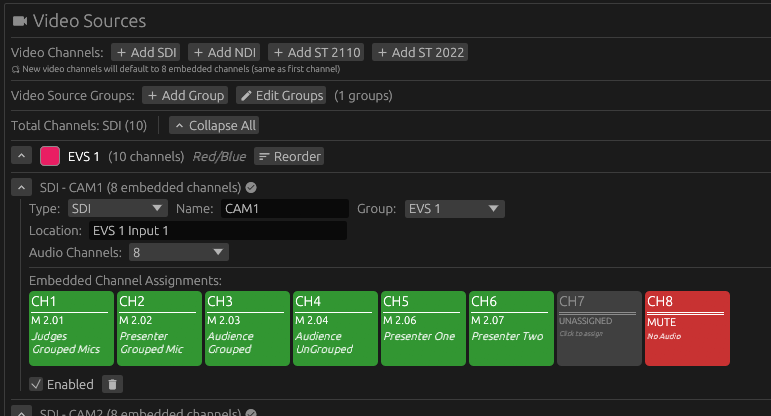
Fields:
- Label: Your display name (like “Cam 1” or “EVS A In 1”)
- Embedded Audio Capacity: Number of embedded audio channels (typically 8 or 16)
- Location: Physical or network location for documentation (optional)
- Group: Assign to a video group for organization (optional)
NDI, ST 2110, and ST 2022 sources use identical dialogs with type-appropriate defaults.
Video Source Properties
Section titled “Video Source Properties”Label:
Identifies the video source uniquely. Examples: SDI 1, SDI 2, EVS 1 Left, Camera ISO 5, Program Feed.
Location:
Documents physical or network location. Examples: “Rack 3, Unit 12”, “192.168.1.45”, “Truck Bay 2”, “Studio B Router Output 7”. Appears in exports and reports for troubleshooting and equipment tracking.
Embedded Capacity:
Total audio channels this video supports. Common values are 8 channels (standard SDI embedded audio) or 16 channels (extended SDI or IP video formats). Determines how many audio assignment slots appear. When changing capacity after assignments exist, reducing removes assignments beyond the new capacity (with warning), while increasing adds empty slots at the end.
Deleting Video Sources
Section titled “Deleting Video Sources”Click the delete button on the video source header.
If the video source has audio assignments, Nipper prompts:
“This video source has X audio assignments. Delete anyway?”
Confirmation removes the video source and all its assignments.